
Preview panel settings
The preview panel lets you review and configure how your content will appear before it’s published. It brings together a visual preview and key settings such as geo-targeting, thumbnails, labels, scheduling, and more.
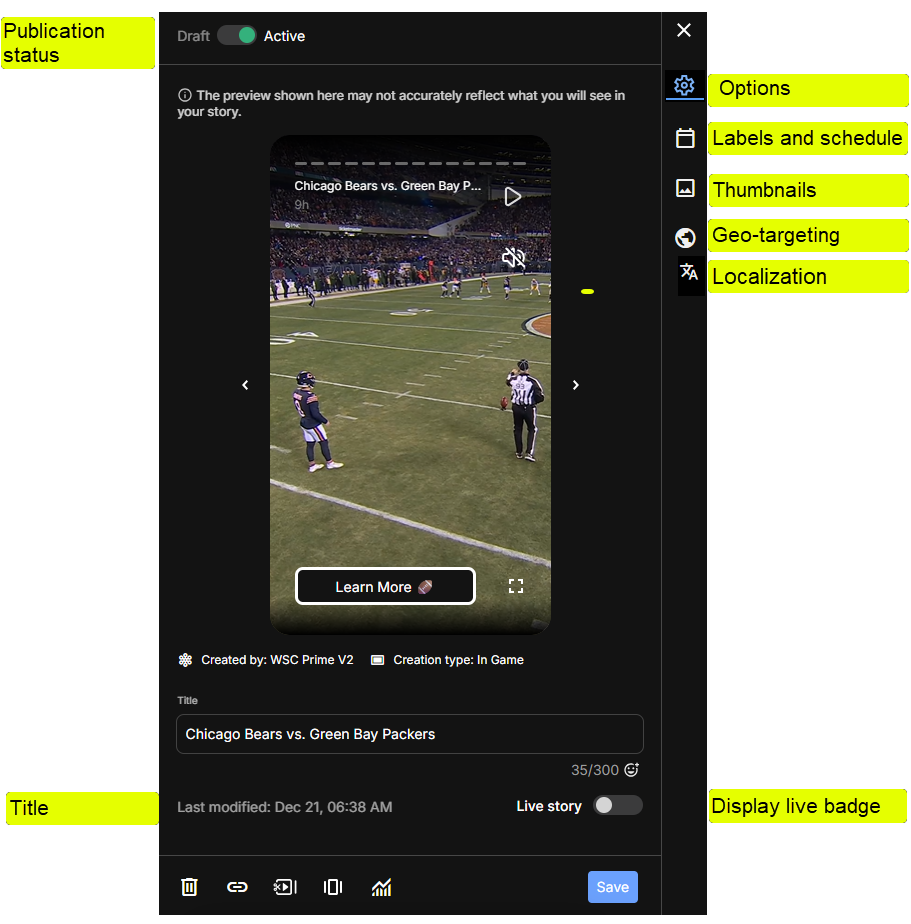
Preview panel settings
Activation status
- Switch the status between Draft and Active.
- When set to Active, content is available for delivery to your digital properties.
- You can also change status automatically by game event, fixed time, or delay. See Automatic event-based activation.
Title
- Edit the current content title.
- View the title character count.
Display Live badge
- Toggle whether the Live badge is displayed on the content.
- This is useful for highlighting live or real-time content when applicable.
- Typically, the Live badge is toggled by automation based on the actual game.
Thumbnails
See Thumbnail Edit
Geo-targeting
See Geo-targeting
Labels and schedule
Localization
Updated 13 days ago
Did this page help you?