
Widgets - Android
There are different types of widgets that can be integrated:
-
BlazeStoriesWidgetGridView - This represents a Blaze widget view for stories with a grid layout on a vertical axis.
-
BlazeStoriesWidgetRowView - This represents a Blaze widget view for stories with a row layout on a horizontal axis.
-
BlazeMomentsWidgetGridView - This represents a Blaze widget view for moments with a grid layout on a vertical axis.
-
BlazeMomentsWidgetRowView - This represents a Blaze widget view for moments with a row layout on a horizontal axis.
-
BlazeVideosWidgetGridView - This represents a Blaze widget view for videos with a grid layout on a vertical axis.
-
BlazeVideosWidgetRowView - This represents a Blaze widget view for videos with a row layout on a horizontal axis.
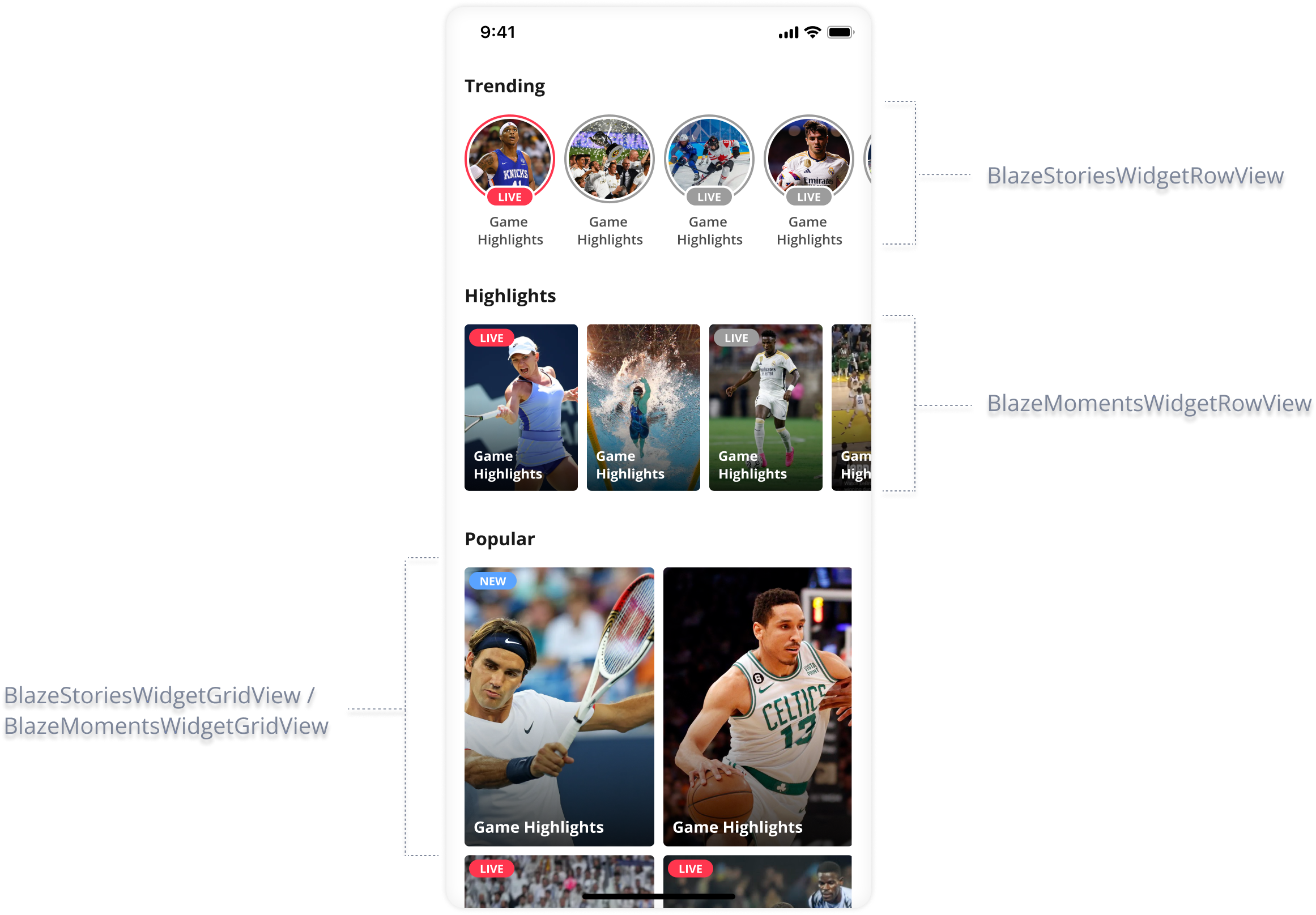
Widgets will notify if any data exists for display.Widget doesn't provide empty state UI display.
App developers should make sure to decide on proper logic for empty state.
initWidgetmust be called before any of the widget's methods.Otherwise, BlazeException.WidgetNotInitializedException exception will be thrown.
Implementation
Widget Initialization
Stories Row
val widgetItemStyle = BlazeWidgetLayout.Presets.StoriesWidget.Row.circles

binding.storiesRowWidget.initWidget(
    widgetLayout = widgetItemStyle,
    playerStyle = BlazeStoryPlayerStyle.base(),
    dataSource = BlazeDataSourceType.Labels(BlazeWidgetLabel.singleLabel("some-label")),
    widgetId = "simpleID-stories-row-widget",
    widgetRemoteIdentifier = "remote-widget-id-stories-row-widget",
    cachingLevel = BlazeSDK.cachingLevel,
    shouldOrderWidgetByReadStatus = true,
    widgetDelegate = object : BlazeWidgetDelegate {
      	// Here is your optional implementation
    },
    perItemStyleOverrides = mapOf(
      BlazeWidgetItemCustomMapping(
        key = "someKey",
        value = "someValue"
      ) to BlazeWidgetItemStyleOverrides(
        // Make sure to deep copy before modifying any value!
        statusIndicator = widgetItemStyle.statusIndicator.blazeDeepCopy().apply {
          // Whatever changes needs to be made on the status indicator
        },

        // Make sure to deep copy before modifying any value!
        badge = widgetItemStyle.badge.blazeDeepCopy().apply {
          // Whatever changes needs to be made on the badge
        }
      )
    ),
    onWidgetItemClickHandler = object : BlazeWidgetItemClickHandlerState {
      // Here is your optional implementation
    }
)
Stories Grid
val widgetItemStyle = BlazeWidgetLayout.Presets.StoriesWidget.Grid.twoColumnsVerticalRectangles

binding.storiesGridWidget.initWidget(
    widgetLayout = widgetItemStyle,
    playerStyle = BlazeStoryPlayerStyle.base(),
    dataSource = BlazeDataSourceType.Labels(BlazeWidgetLabel.singleLabel("some-label")),
    widgetId = "simpleID-stories-grid-widget",
    widgetRemoteIdentifier = "remote-widget-id-stories-grid-widget",
    cachingLevel = BlazeSDK.cachingLevel,
    shouldOrderWidgetByReadStatus = true,
    widgetDelegate = object : BlazeWidgetDelegate {
      // Here is your optional implementation
    },
    perItemStyleOverrides = mapOf(
      BlazeWidgetItemCustomMapping(
        key = "someKey",
        value = "someValue"
      ) to BlazeWidgetItemStyleOverrides(
        // Make sure to deep copy before modifying any value!
        statusIndicator = widgetItemStyle.statusIndicator.blazeDeepCopy().apply {
          // Whatever changes needs to be made on the status indicator
        },

        // Make sure to deep copy before modifying any value!
        badge = widgetItemStyle.badge.blazeDeepCopy().apply {
          // Whatever changes needs to be made on the badge
        }    )
    ),
    onWidgetItemClickHandler = object : BlazeWidgetItemClickHandlerState {
      // Here is your optional implementation
    }
)
Moments Row
val widgetItemStyle = BlazeWidgetLayout.Presets.MomentsWidget.Row.verticalRectangles

binding.momentsRowWidget.initWidget(
    widgetLayout = widgetItemStyle,
    playerStyle = BlazeMomentsPlayerStyle.base(),
    dataSource = BlazeDataSourceType.Labels(BlazeWidgetLabel.singleLabel("some-label")),
    widgetId = "simpleID-moments-row-widget",
    widgetRemoteIdentifier = "remote-widget-id-moments-row-widget",
    shouldOrderWidgetByReadStatus = true,
    cachingLevel = BlazeSDK.cachingLevel,
    widgetDelegate = object : BlazeWidgetDelegate {
      // Here is your optional implementation
    },
    perItemStyleOverrides = mapOf(
      BlazeWidgetItemCustomMapping(
        key = "someKey",
        value = "someValue"
      ) to BlazeWidgetItemStyleOverrides(
        // Make sure to deep copy before modifying any value!
        statusIndicator = widgetItemStyle.statusIndicator.blazeDeepCopy().apply {
          // Whatever changes needs to be made on the status indicator
        },

        // Make sure to deep copy before modifying any value!
        badge = widgetItemStyle.badge.blazeDeepCopy().apply {
          // Whatever changes needs to be made on the badge
        }
      )
    ),
    onWidgetItemClickHandler = object : BlazeWidgetItemClickHandlerState {
      // Here is your optional implementation
    }
)
Moments Grid
val widgetItemStyle = BlazeWidgetLayout.Presets.MomentsWidget.Grid.twoColumnsVerticalRectangles

binding.momentsGridWidget.initWidget(
    widgetLayout = widgetItemStyle,
    playerStyle = BlazeMomentsPlayerStyle.base(),
    dataSource = BlazeDataSourceType.Labels(BlazeWidgetLabel.singleLabel("some-label")),
    widgetId = "simpleID-moments-grid-widget",
    widgetRemoteIdentifier = "remote-widget-id-moments-grid-widget",
    shouldOrderWidgetByReadStatus: Boolean = true,
    cachingLevel = BlazeSDK.cachingLevel,
    widgetDelegate = object : BlazeWidgetDelegate {
      // Here is your optional implementation
    },
    perItemStyleOverrides = mapOf(
      BlazeWidgetItemCustomMapping(
        key = "someKey",
        value = "someValue"
      ) to BlazeWidgetItemStyleOverrides(
        // Make sure to deep copy before modifying any value!
        statusIndicator = widgetItemStyle.statusIndicator.blazeDeepCopy().apply {
          // Whatever changes needs to be made on the status indicator
        },

        // Make sure to deep copy before modifying any value!
        badge = widgetItemStyle.badge.blazeDeepCopy().apply {
          // Whatever changes needs to be made on the badge
        }    )
    ),
    onWidgetItemClickHandler = object : BlazeWidgetItemClickHandlerState {
      // Here is your optional implementation
    }
)
Videos Row
val widgetItemStyle = BlazeWidgetLayout.Presets.VideosWidget.Row.verticalRectangles

binding.videosRowWidget.initWidget(
    widgetLayout = widgetItemStyle,
    playerStyle = BlazeVideosPlayerStyle.base(),
    dataSource = BlazeDataSourceType.Labels(BlazeWidgetLabel.singleLabel("some-label")),
    widgetId = "simpleID-videos-row-widget",
    widgetRemoteIdentifier = "remote-widget-id-videos-row-widget",
    shouldOrderWidgetByReadStatus = true,
    cachingLevel = BlazeSDK.cachingLevel,
    widgetDelegate = object : BlazeWidgetDelegate {
      // Here is your optional implementation
    },
    perItemStyleOverrides = mapOf(
      BlazeWidgetItemCustomMapping(
        key = "someKey",
        value = "someValue"
      ) to BlazeWidgetItemStyleOverrides(
        // Make sure to deep copy before modifying any value!
        statusIndicator = widgetItemStyle.statusIndicator.blazeDeepCopy().apply {
          // Whatever changes needs to be made on the status indicator
        },

        // Make sure to deep copy before modifying any value!
        badge = widgetItemStyle.badge.blazeDeepCopy().apply {
          // Whatever changes needs to be made on the badge
        }
      )
    ),
    onWidgetItemClickHandler = object : BlazeWidgetItemClickHandlerState {
      // Here is your optional implementation
    }
)
Videos Grid
val widgetItemStyle = BlazeWidgetLayout.Presets.VideosWidget.Grid.twoColumnsVerticalRectangles

binding.videosGridWidget.initWidget(
    widgetLayout = widgetItemStyle,
    playerStyle = BlazeVideosPlayerStyle.base(),
    dataSource = BlazeDataSourceType.Labels(BlazeWidgetLabel.singleLabel("some-label")),
    widgetId = "simpleID-videos-grid-widget",
    widgetRemoteIdentifier = "remote-widget-id-videos-grid-widget",
    shouldOrderWidgetByReadStatus: Boolean = true,
    cachingLevel = BlazeSDK.cachingLevel,
    widgetDelegate = object : BlazeWidgetDelegate {
      // Here is your optional implementation
    },
    perItemStyleOverrides = mapOf(
      BlazeWidgetItemCustomMapping(
        key = "someKey",
        value = "someValue"
      ) to BlazeWidgetItemStyleOverrides(
        // Make sure to deep copy before modifying any value!
        statusIndicator = widgetItemStyle.statusIndicator.blazeDeepCopy().apply {
          // Whatever changes needs to be made on the status indicator
        },

        // Make sure to deep copy before modifying any value!
        badge = widgetItemStyle.badge.blazeDeepCopy().apply {
          // Whatever changes needs to be made on the badge
        }    )
    ),
    onWidgetItemClickHandler = object : BlazeWidgetItemClickHandlerState {
      // Here is your optional implementation
    }
)
Properties & Methods
widgetLayout
var widgetLayout: BlazeWidgetLayoutThis property represents the widget's layout style. You can modify it or its properties to change the widget's layout. Read more about the customization options in the Widgets Customizations section.
widgetId
Starting November 2025, regard population of this property as being mandatory
var widgetId: StringA required string that uniquely identifies the widget instance within your integration. This identifier is critical for tracking, analytics, and accurate attribution of widget performance data.
If this property isn't set:
- The system can't detect the source location of event data.
- Reports dependent on location-based segmentation—such as "performance by location"—will be unavailable.
widgetRemoteIdentifier
var widgetRemoteIdentifier: String?The widgetRemoteIdentifier property represents the remote identifier of the Blaze widget. Defaults to null.
When a widget with this identifier exists in the CMS, the widget derives its layout (UI) and data source from there.
dataSource
var dataSource: BlazeDataSourceTypeThe dataSource property represents the dataSourceType associated with the Blaze widget. dataSource is built with BlazeDataSourceType.
cachingLevel
var cachingLevel: BlazeCachingLevelOverrides the cachingLevel for the specific widget. Read more about the options available under the BlazeCachingLevel section.
playerStyle - Stories
var playerStyle: BlazeStoryPlayerStyleOverrides the story style for the specific widget. You can modify this property or its properties to change and override the default player style. Read more about the customization options available under the Story Player Customizations section.
playerStyle - Moments
var playerStyle: BlazeMomentsPlayerStyleOverrides the moments style for the specific widget. You can modify this property or its properties to change and override the default player style. Read more about the customization options available under the Moments Player Customizations section.
playerStyle - Videos
var playerStyle: BlazeVideosPlayerStyleOverrides the videos style for the specific widget. You can modify this property or its properties to change and override the default player style. Read more about the customization options available under the Videos Player Customizations section.
shouldOrderWidgetByReadStatus
var shouldOrderWidgetByReadStatus: BooleanA flag indicating whether items should be ordered by their read status. For interaction with advanced order and the difference between reordering and filtering read content, see Ordering and item limits.
- When this flag is set to
true, the widget will display items in an order where unread items appear first, followed by the read items. This flag istrueby default. - When this flag is set to
false, read/unread does not change item order.
If all items have been viewed, the original order of items will be maintained.
perItemStyleOverrides
var perItemStyleOverrides: Map<BlazeWidgetItemCustomMapping, BlazeWidgetItemStyleOverrides>A map property that mapsBlazeWidgetItemCustomMapping instances to BlazeWidgetItemStyleOverrides. This mapping enables the application of custom style overrides to individual items within the widget based on specified criteria or attributes.
The keys in this map are instances of BlazeWidgetItemCustomMapping, which consists of custom key-value pairs. These pairs define specific criteria or attributes for which the corresponding BlazeWidgetItemStyleOverrides should be applied. For example, custom mapping could be defined as applying a unique style to all items related to a specific game ID or player ID.
The values in the map are BlazeWidgetItemStyleOverrides instances. Each BlazeWidgetItemStyleOverrides instance specifies how the item's style should be customized. This allows for detailed customization of item styles within the widget, enhancing the visual diversity and relevance of the widget's content.
Usage Example :
// Choose whatever presets works for you
val widgetItemStyle = BlazeWidgetLayout.Presets.StoriesWidget.Row.circles.widgetItemStyle

BlazeWidgetItemCustomMapping(
    key = BlazeWidgetItemCustomMapping.BlazeKeysPresets.PLAYER_ID.value,
    value = "123456"
  ) to BlazeWidgetItemStyleOverrides(
    // Make sure to deep copy before modifying any value!
    statusIndicator = widgetItemStyle.statusIndicator.blazeDeepCopy().apply {
      // Whatever changes needs to be made on the status indicator
    },

    // Make sure to deep copy before modifying any value!
    badge = widgetItemStyle.badge.blazeDeepCopy().apply {
      // Whatever changes needs to be made on the badge
    }
  ),
  BlazeWidgetItemCustomMapping(
    key = BlazeWidgetItemCustomMapping.BlazeKeysPresets.GAME_ID.value,
    value = "98765"
  ) to BlazeWidgetItemStyleOverrides(

    // Make sure to deep copy before modifying any value!
    statusIndicator = widgetItemStyle.statusIndicator.blazeDeepCopy().apply {
      // Whatever changes needs to be made on the status indicator
    },

    // Make sure to deep copy before modifying any value!
    badge = widgetItemStyle.badge.blazeDeepCopy().apply {
      // Whatever changes needs to be made on the badge
    }
 )
This example shows how perItemStyleOverrides can be used to apply specific style overrides to widget items based on player ID and game ID, respectively. Each item matching the custom mapping criteria will have its style customized according to the defined BlazeWidgetItemStyleOverrides.
onWidgetItemClickHandler
val onWidgetItemClickHandler: (() -> BlazeWidgetItemClickHandlerState)? = nullSee more at BlazeWidgetItemClickHandlerState.
widgetDelegate
widgetDelegate: BlazeWidgetDelegateWidget delegates of type BlazeWidgetDelegate for specific Widget.
playbackConfiguration
playbackConfiguration: BlazeVideosPlaybackConfiguration?playbackConfiguration: BlazeMomentsPlaybackConfiguration?The playback configuration for the specific widget. If null, the widget will use the global default playback configuration. Can be updated at runtime via updatePlaybackConfiguration().
Note - this property is relevant only to Videos and Moments Widgets.
play
method signature
fun play()Calls the widget to play its contents, starting from the first item.
Use this method to manually play a widget's content that has been successfully preloaded.
Note: Manually calling play on a widget means you gain control but also the responsibility to call this method only after the widget's onDataLoadComplete has been called successfully. Otherwise, the widget has no content to play.
play(from: BlazeWidgetPlayFrom)
method signature
fun play(from: BlazeWidgetPlayFrom)Calls the widget to play its contents, starting from the specified position. Use this method to manually play a widget's content from a specific position.
Use this method to manually play a widget's content that has been successfully preloaded.
Note: Manually calling play on a widget means you gain control but also the responsibility to call this method only after the widget's onDataLoadComplete has been called successfully. Otherwise, the widget has no content to play.
updateWidgetsUi
method signature
fun updateWidgetsUi()Updates the widget user interface. This method is responsible for applying any pending changes to the widgets' appearances (i.e., style overrides).
updateOverrideStyles
method signature
fun updateOverrideStyles(
  perItemStyleOverrides: Map<BlazeWidgetItemCustomMapping, BlazeWidgetItemStyleOverrides?>,
  shouldUpdateUi: Boolean = true
)
Updates style overrides for multiple items within the widget based on custom mappings and optionally refreshes the widget's UI to reflect these changes.
This method supports bulk updates to the styles of multiple items, allowing for efficient customization of the widget's appearance.
Passing null as a style for an item removes the existing override for that item. If you want to reset all given override styles for a widget, please see resetOverriddenStyles.
Parameters:
- perItemStyleOverrides: A map of
BlazeWidgetItemCustomMappingobjects to optionalBlazeWidgetItemStyleOverrides. Each entry specifies the custom mapping for an item and the new style to be applied. Passnullas the value to remove the current override for the corresponding item.. - shouldUpdateUi: A Boolean value indicating whether the widget's UI should be updated immediately to reflect the style changes. The default is
true.
Usage:
val customMapping1 = BlazeWidgetItemCustomMapping(key = "playerId", value = "12345")
val customMapping2 = BlazeWidgetItemCustomMapping(key = "gameId", value = "67890")

val style1 = BlazeWidgetItemStyleOverrides(...)
val style2 = BlazeWidgetItemStyleOverrides(...)

widgetView.updateOverrideStyles(perItemStyleOverrides = mapOf(customMapping1 to style1, customMapping2 to style2))
This example updates the styles for items identified by specific player and game IDs, immediately refreshing the widget's UI to display the changes.
resetOverriddenStyles
method signature
fun resetOverriddenStyles()Resets any existing style overrides, and updates the widget's UI.
updateDataSource
method signature
fun updateDataSource(dataSource: BlazeDataSourceType, isSilentRefresh: Boolean = false)Updates the dataSource and Reloads the data for the widget.
Parameters:
- dataSource:
BlazeDataSourceType - isSilentRefresh: A flag indicating if the refresh is silent. This can be used to determine if the UI should display a loading skeleton animation or perform the refresh silently in the background.
reloadData
fun reloadData(isSilentRefresh: Boolean)Reloads the data to be displayed in the widget in the current configuration.
Parameters:
- isSilentRefresh: A flag indicating if the refresh is silent. This can be used to determine if the UI should display a loading skeleton animation or perform the refresh silently in the background.
getCurrentWidgetLayout
fun getCurrentWidgetLayout(): BlazeWidgetLayout?Expose a deep copy of the widget's layout .
This function returns a deep-copy instance of the widget layout. This is necessary to avoid modifications by reference.
Returns a deep-copy instance of the widget's BlazeWidgetLayout.
updateWidgetLayout
fun updateWidgetLayout(blazeWidgetLayout: BlazeWidgetLayout)Set the widget layout with a deep copy to avoid modifications by reference. The widget's UI will be updated immediately to reflect the style changes.
Parameters:
- blazeWidgetLayout: The widget layout to set.
Stories updatePlayerStyle
fun updatePlayerStyle(playerStyle: BlazeStoryPlayerStyle)Set the player style with a deep copy to avoid modifications by reference.
Parameters:
- playerStyle: The player style to set.
Moments updatePlayerStyle
fun updatePlayerStyle(playerStyle: BlazeMomentsPlayerStyle)Set the player style with a deep clone to avoid modifications by reference.
Parameters:
- playerStyle: The player style to set.
Videos updatePlayerStyle
fun updatePlayerStyle(playerStyle: BlazeVideosPlayerStyle)Set the player style with a deep clone to avoid modifications by reference.
Parameters:
- playerStyle: The player style to set.
Stories getCurrentPlayerStyle
fun getCurrentPlayerStyle(): BlazeStoryPlayerStyle?Expose a deep copy of the player style.
This function returns a deep-copy instance of the player style. This is necessary to avoid modifications by reference, a deep copy is needed.
Returns a deep-copy instance of the BlazeStoryPlayerStyle.
Moments getCurrentPlayerStyle
fun getCurrentPlayerStyle(): BlazeMomentsPlayerStyle?Expose a deep copy of the player style.
This function returns a deep-copy instance of the player style. This is necessary to avoid modifications by reference, a deep copy is needed.
Returns a deep-copy instance of the BlazeMomentsPlayerStyle.
Videos getCurrentPlayerStyle
fun getCurrentPlayerStyle(): BlazeVideosPlayerStyle?Expose a deep copy of the player style.
This function returns a deep-copy instance of the player style. This is necessary to avoid modifications by reference, a deep copy is needed.
Returns a deep-copy instance of the BlazeVideosPlayerStyle.
Videos updatePlaybackConfiguration
fun updatePlaybackConfiguration(playbackConfiguration: BlazeVideosPlaybackConfiguration?)Set the playback configuration with a copy to avoid modifications by reference.
playbackConfigurationThe playback configuration to set. Passnullto reset and use the global default configuration.
Videos getCurrentPlaybackConfiguration
fun getCurrentPlaybackConfiguration(): BlazeVideosPlaybackConfiguration?Returns a copy instance of the current BlazeVideosPlaybackConfiguration, or null if using the global default.
Stories adsConfigType
fun updateAdsConfigType(storiesAdsConfigType: BlazeStoriesAdsConfigType)Update ads configuration according to storiesAdsConfigType. The default value for storiesAdsConfigType is BlazeStoriesAdsConfigType.FIRST_AVAILABLE_ADS_CONFIG.
More info can be found here.
Moments adsConfigType
fun updateAdsConfigType(momentsAdsConfigType: BlazeMomentsAdsConfigType)Update ads configuration according to momentsAdsConfigType. The default value for momentsAdsConfigType is BlazeMomentsAdsConfigType.FIRST_AVAILABLE_ADS_CONFIG.
More info can be found here.
Videos adsConfigType
fun updateAdsConfigType(videosAdsConfigType: BlazeVideosAdsConfigType)Update ads configuration according to videosAdsConfigType. The default value for videosAdsConfigType is BlazeVideosAdsConfigType.FIRST_AVAILABLE_ADS_CONFIG.
More info can be found here.
Widget Delegate Methods
BlazeWidgetDelegate is an interface that extends the functionalities of BlazePlayerSourceDelegate and provides additional callback methods specific to Row and Grid widgets. This delegate allows your app to handle various types of events.
All functions in this interface are optional, the choice of which function to implement is left for app developers.
Implementation
In addition to the methods defined in BlazePlayerSourceDelegate, BlazeWidgetDelegate provides the following methods:
onItemClicked
fun onItemClicked(
  sourceId: String?,
  itemId: String,
  itemTitle: String
)
This method will be called when a widget item is clicked with the following:
- sourceId -> The the widget Id of the item clicked.
- itemId -> The id of the item clicked.
- itemTitle -> The item title.
Perform desired action when widget item is clicked.
Updated 2 months ago