
Overview panel settings
The Overview panel lets you review and configure how your content appears to viewers. To open it, select an asset and click the gear icon. It brings together a visual preview and key settings such as geo-targeting, thumbnails, labels, scheduling, and more. The preview may look different from what viewers see in your app.
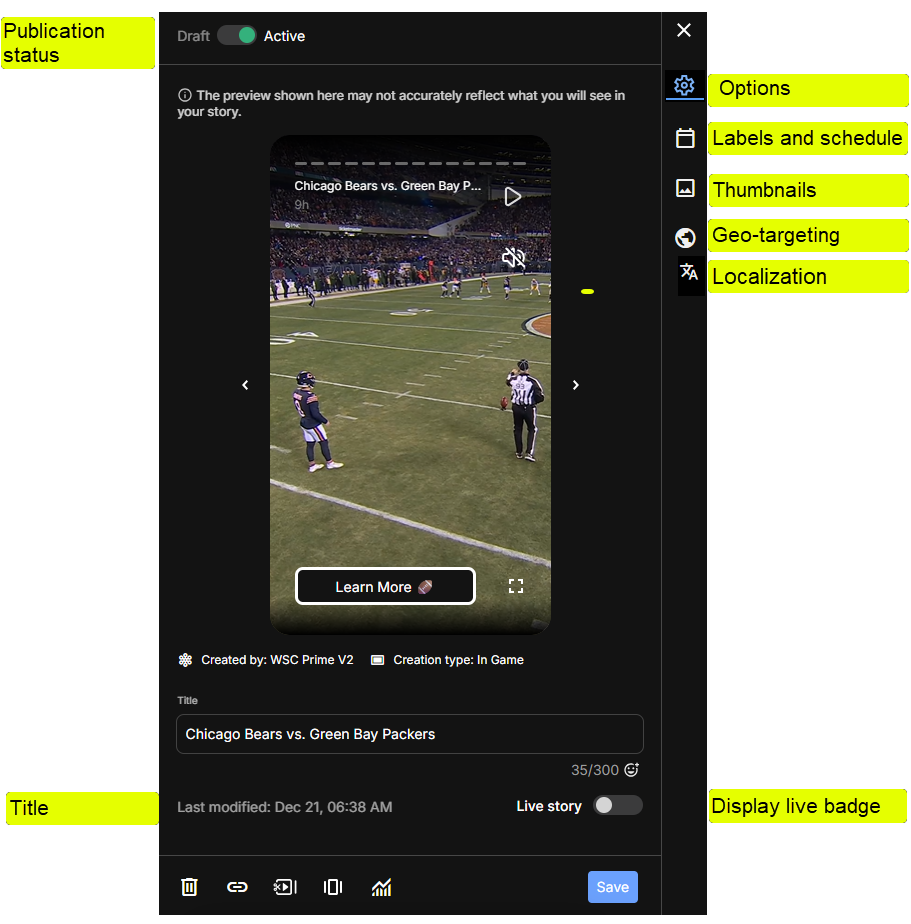
Overview panel settings
Active
- Turn Active on or off.
- On: the content is available to viewers. It still needs a scheduled label, unless the app requests it by ID. See Labels and scheduling.
- Off: the content isn't available to viewers. Its availability status shows as Draft.
- Turning Active on or off by hand cancels any automatic change that hasn't happened yet.
Activate or deactivate automatically
- When Active is off, set Activate automatically. When it's on, set Deactivate automatically.
- Choose Never, or At a specific time and then set the date, time, and time zone.
- Triggers based on game events or a delay are set when content is published from Create, Rules, or Clipro. See Automatic event-based activation.
Title
- Edit the current content title.
- View the title character count.
Subtitle and description
- Moments: edit the Subtitle and Description.
- Videos: edit the Description.
Title image
Stories only, when title images are enabled for your account.
- Turn on Show title image to display an image with the Story title.
- Choose Default image, Circle thumbnail, or Custom image. For a custom image, select Add image.
Show live indicator
Stories only.
- Turn on Show live indicator to display the live chip on the Story.
- Use it to highlight live or real-time content.
- Typically, automation turns the live indicator on and off based on the actual game.
Item details
At the bottom of the panel, see who created the item (when your account has more than one group), its Creation type, and when it was Last modified.
Thumbnails
See Thumbnail Edit
Geo-targeting
See Geo-targeting
Labels and schedule
Localization
See Translate content. For how localization works, see Text localization.
Updated about 16 hours ago
Did this page help you?