
BlazeMomentsPlayerContainer
The BlazeMomentsPlayerContainer is a component that enables embedding and managing the playback of moments in your application. It offers a flexible and customizable framework for presenting moments, allowing for detailed control over playback settings and events. This component simplifies integrating dynamic and engaging content into apps, enhancing user interaction with rich media.
General
There are different types of player containers that can be integrated:
- BlazeMomentsPlayerContainer - is a class designed to manage and facilitate the playback of moments based on a specified data source type. It provides functionality to embed and control moments playback within a specified container. The container provides flexibility in determining how and where moments are presented, offering customization and delegation to handle various events.
Usage: Instantiate theBlazeMomentsPlayerContainerwith the desired configuration and delegate, then use thestartPlaying(in:containerView:)method to begin playback of moments within the specified view controller and container view. TheclosePlayer(completion:)method allows for graceful playback termination.
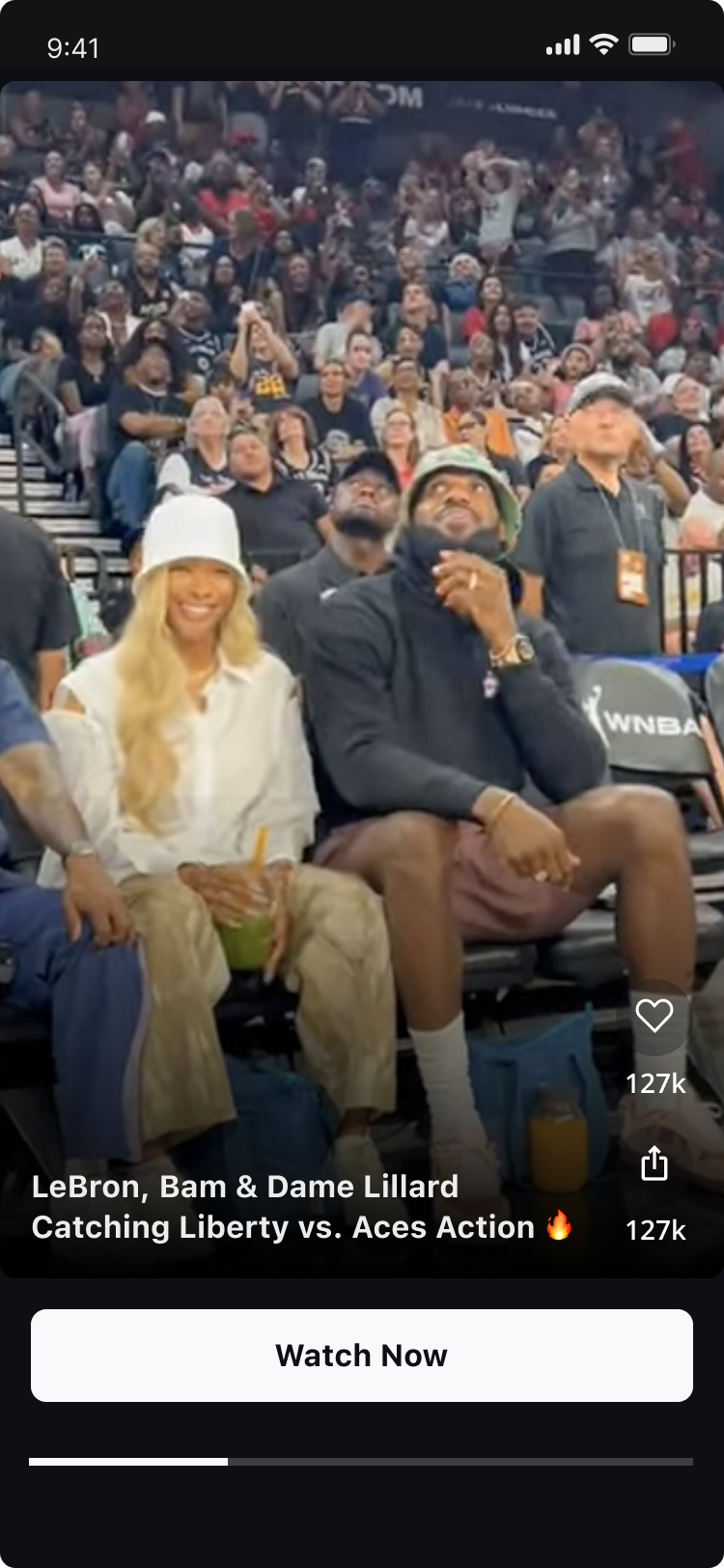
The player container notifies you when data exists for display. Handle empty data in your app: the player container doesn't provide empty-state UI.
BlazeMomentsPlayerContainer
initialize
Initializes a new instance of BlazeMomentsPlayerContainer
Parameters:
- dataSourceType: The
dataSourceTypeproperty represents the dataSourceType associated with the Blaze Player Container. dataSourceType is built withBlazeDataSourceType - shouldOrderMomentsByReadStatus: A flag to indicate whether moments should be ordered by their read status. defaults to true
- containerDelegate: The
containerDelegateproperty represents the delegate object for the Blaze Player Container. - containerIdentifier: The
containerIdentifierproperty represents the identifier of the Blaze Player Container. Defaults to (Date().timeIntervalSince1970) string. - cachePolicyLevel: The
cachePolicyLevelproperty represents the cache policy level of the Blaze Player Container. Defaults to The policy level that was defined in the global level - style: The
styleproperty represents the style configuration of the moments in the Blaze Player Container. Defaults to The style that was defined in the global level - playbackConfiguration: The
playbackConfigurationproperty represents the playback configuration of the moments in the Blaze Player Container. Controls loop behavior and playback settings. Defaults to The playback configuration that was defined in the global level - adsConfigType: This property manages the advertisement configuration for Blaze Moments.
Its default behavior is to adhere to the first ad configuration established for the entire app.
If a matching configuration is not found, the default behavior is to fallback to a state where no ads are displayed (none). Defaults to .firstAvailableAdsConfig
init(dataSourceType: BlazeDataSourceType,
                shouldOrderMomentsByReadStatus: Bool = true,
                containerDelegate: BlazePlayerContainerDelegate? = nil,
                containerIdentifier: String = "\(Date().timeIntervalSince1970)",
                cachePolicyLevel: BlazeCachePolicyLevel? = nil,
                style: BlazeMomentsPlayerStyle? = nil,
                playbackConfiguration: BlazeMomentsPlaybackConfiguration? = nil,
                adsConfigType: BlazeMomentsAdsConfigType = .firstAvailableAdsConfig)
Example
let dataSourceType: BlazeDataSourceType = .labels(.singleLabel("some-label"))
var appearance = BlazeMomentsAppearance()
//Some appearance customization
appearance.buttons.exit.isVisible = false
appearance.buttons.exit.isVisibleForAds = false
appearance.buttons.mute.isVisible = false
appearance.buttons.mute.isVisibleForAds = false
appearance.seekBarStyle.isVisible = false
appearance.headerGradient.isVisible = false

var playbackConfiguration = BlazeMomentsPlaybackConfiguration.base()
playbackConfiguration.loopBehavior = .loopAndAdvance(numberOfPlays: 3)

let playerContainer = BlazeMomentsPlayerContainer(
    dataSourceType: dataSourceType,
    containerDelegate: self,
    containerIdentifier: "container id",
    appearance: momentsAppearance,
    playbackConfiguration: playbackConfiguration
)
playerContainer.prepareMoments()
Methods
startPlaying
method signature
func startPlaying(in containerVC: UIViewController, containerView: UIView? = nil)This method plays the moments embedded in a container for the provided dataSourceType, which is built using`BlazeDataSourceType.
Parameters:
- container VC: A container
UIViewControllerin which the moments should be embedded. - containerView: The view to play the moments in. Defaults to containerVC.view.
- Important: This method should be used only in a UIKit environment. When using
BlazeMomentsPlayerContainerin SwiftUI, the content will play immediately after creating the' BlazeSwiftUIMomentsContainerView'. - Note:
BlazeMomentsPlayerContainerwill call actions on its providedBlazePlayerContainerDelegateobject, which you can use to observe the data loading methods in cases where the content hasn't been prepared initially.
closePlayer
method signature
func closePlayer(completion: (() -> Void)?)close the moments player embedded in a container.
Parameters:
- completion: An optional closure to be executed after the player is closed.
prepareMoments
method signature
func prepareMoments()Prepares moments for a specific dataSource type.
This method prepares and loads moments for the initially provided dataSourceType, which is built using BlazeDataSourceType.
- Important:
BlazeDataSourceType.recommendations(.forYou)is unsupported for preparation and throws aonDataLoadCompleteerror. This type of data source should be used only to play content directly, using thestartPlayingmethod. - Note:
BlazeMomentsPlayerContainerwill call actions on its providedBlazePlayerContainerDelegateobject, which you can use to observe the data loading methods.
pausePlayer
method signature
func pausePlayer()Pauses the player.
This method does not dismiss the player; it simply pauses playback, allowing for later resumption.
resumePlayer
method signature
func resumePlayer()Resumes playback of the player.
If the player is not currently paused, this method has no effect.
updatePlaybackConfiguration
method signature
func updatePlaybackConfiguration(_ configuration: BlazeMomentsPlaybackConfiguration)Updates the playback configuration without recreating the player.
This method updates the playback configuration of the currently embedded player. Changes will be applied immediately to the active player.
Parameters:
- configuration: New playback configuration to apply
Example:
var newPlaybackConfig = BlazeMomentsPlaybackConfiguration.base()
newPlaybackConfig.loopBehavior = .infiniteLoop

playerContainer.updatePlaybackConfiguration(newPlaybackConfig)
updateContent
method signature
func updateContent(dataSourceType: BlazeDataSourceType? = nil,
                              shouldOrderMomentsByReadStatus: Bool? = nil,
                              cachePolicyLevel: BlazeCachePolicyLevel? = nil,
                              style: BlazeMomentsPlayerStyle? = nil,
                              adsConfigType: BlazeMomentsAdsConfigType? = nil)
Updates the content of the player.
This method will reset the current player if exists and load the new content.
Parameters:
- dataSourceType: The
dataSourceTypeproperty represents the dataSourceType associated with the Blaze Player Container. dataSourceType is built withBlazeDataSourceType.nilvalue will not change the current value but will reload the content - shouldOrderMomentsByReadStatus: A flag to indicate whether moments should be ordered by their read status.
nilvalue will not change the current value - cachePolicyLevel: The
cachePolicyLevelproperty represents the cache policy level of the Blaze Player Container.nilvalue will not change the current value - style: The
styleproperty represents the style configuration of the moments in the Blaze Player Container.nilvalue will not change the current value - adsConfigType: This property controls the advertisement configuration for Blaze Moments.
nilvalue will not change the current value
BlazePlayerContainerDelegate
BlazePlayerContainerDelegate is a struct that implements BlazePlayerSourceDelegate defining the handlers closures that receive callbacks for a player container.
ThesourceIdrepresentscontainerIdentifier
You can implement the following methods:
onDataLoadStarted
No Longer Available: Use BlazePlayerSourceDelegate.onDataLoadStarted instead.
onDataLoadComplete
No Longer Available: Use BlazePlayerSourceDelegate.onDataLoadComplete instead.
onContainedPlayerDismissed
No Longer Available: Use BlazePlayerSourceDelegate.onPlayerDidDismiss instead.
onTriggerCTA
No Longer Available: Use BlazePlayerSourceDelegate.onTriggerCTA instead.
BlazeMomentsPlaybackConfiguration
The BlazeMomentsPlaybackConfiguration allows you to control playback behavior for moments in the container. This configuration can be set during initialization or updated dynamically using the updatePlaybackConfiguration method.
Usage with BlazeMomentsPlayerContainer
Initial Configuration
You can provide a playback configuration when initializing the container:
var playbackConfiguration = BlazeMomentsPlaybackConfiguration.base()
playbackConfiguration.loopBehavior = .loopAndAdvance(numberOfPlays: 3)

let playerContainer = BlazeMomentsPlayerContainer(
    dataSourceType: .labels(.singleLabel("highlights")),
    containerDelegate: delegate,
    containerIdentifier: "my-container",
    playbackConfiguration: playbackConfiguration
)
If playbackConfiguration is not provided (or set to nil), the container will use the SDK's default playback configuration (Blaze.shared.getDefaultMomentsPlaybackConfiguration()).
Dynamic Updates
You can update the playback configuration at any time after initialization:
// Change loop behavior to infinite loop
var newConfig = BlazeMomentsPlaybackConfiguration.base()
newConfig.loopBehavior = .infiniteLoop
playerContainer.updatePlaybackConfiguration(newConfig)

// Or change to auto-advance after 5 plays
newConfig.loopBehavior = .loopAndAdvance(numberOfPlays: 5)
playerContainer.updatePlaybackConfiguration(newConfig)
Changes are applied immediately to the active player without recreating it.
Configuration Properties
The BlazeMomentsPlaybackConfiguration supports the following properties:
- loopBehavior: Controls how moments loop and advance to the next moment
.infiniteLoop- Moment loops infinitely until user navigates manually.loopAndAdvance(numberOfPlays: Int)- Moment loops a specified number of times, then automatically advances
For more details about BlazeMomentsPlaybackConfiguration, see the BlazeMomentsPlaybackConfiguration documentation.
Updated 2 months ago