
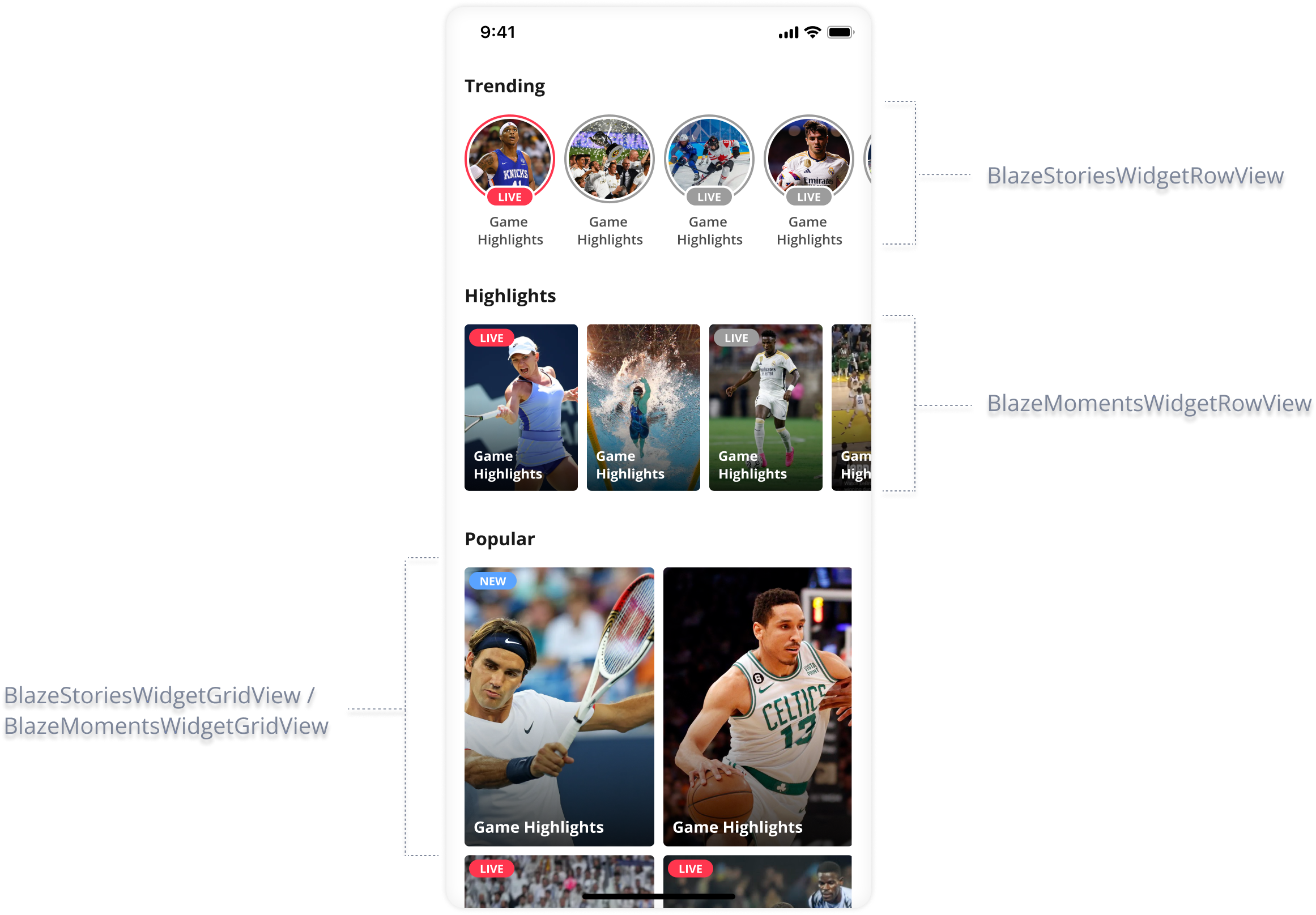
There is a suite of Compose widgets to streamline the integration of Stories and Moments in various widget layouts. These widgets bridge traditional Android views with the Composable architecture, ensuring flexibility while leveraging the power of Jetpack Compose.
- BlazeComposeStoriesWidgetGridView - This represents a Blaze widget Composable for Stories with a grid layout on a vertical axis.
- BlazeComposeStoriesWidgetRowView - This represents a Blaze widget Composable for Stories with a row layout on a horizontal axis.
- BlazeComposeMomentsWidgetGridView - This represents a Blaze widget Composable for moments with a grid layout on a vertical axis.
- BlazeComposeMomentsWidgetRowView - This represents a Blaze widget Composable for moments with a row layout on a horizontal axis.
- BlazeComposeVideosWidgetGridView - This represents a Blaze widget Composable for videos with a grid layout on a vertical axis.
- BlazeVideosWidgetRowView - This represents a Blaze widget Composable for videos with a row layout on a horizontal axis.
Widgets will notify if any data exists for display.
Widget doesn't provide empty state UI display.
App developers should make sure to decide on proper logic for empty state.
Implementation
Prerequisites
- Ensure Jetpack Compose is integrated into your project.
Widget initialization
Stories row
BlazeComposeStoriesWidgetRowView(
    modifier: Modifier = Modifier,
    widgetStoriesStateHandler = BlazeComposeWidgetStoriesStateHandler(...)
)
Stories grid
BlazeComposeStoriesWidgetGirdView(
    modifier: Modifier = Modifier,
    widgetStoriesStateHandler = BlazeComposeWidgetStoriesStateHandler(...)
)
Moments row
BlazeComposeMomentsWidgetRowView(
    modifier: Modifier = Modifier,
    widgetMomentsStateHandler = BlazeComposeWidgetMomentsStateHandler(...)
)
Moments grid
BlazeComposeMomentsWidgetGridView(
    modifier: Modifier,
    widgetMomentsStateHandler = BlazeComposeWidgetMomentsStateHandler(...)
)
Videos row
BlazeComposeVideosWidgetRowView(
    modifier: Modifier = Modifier,
    widgetVideosStateHandler = BlazeComposeWidgetVideosStateHandler(...)
)
Videos grid
BlazeComposeVideosWidgetGridView(
    modifier: Modifier,
    widgetVideosStateHandler = BlazeComposeWidgetVideosStateHandler(...)
)
Stories
Handling stories widget state: BlazeComposeWidgetStoriesStateHandler
BlazeComposeWidgetStoriesStateHandlerBlazeComposeWidgetStoriesStateHandler class acts as a central point for handling widget states and actions, ensuring that interactions with the widget are processed and managed efficiently.
Creation ofBlazeComposeWidgetStoriesStateHandler
BlazeComposeWidgetStoriesStateHandlerEach BlazeComposeWidgetStoriesStateHandler instance must be associated with a unique widgetId to ensure proper management and avoid conflicts. It's crucial to instantiate BlazeComposeWidgetStoriesStateHandler at the top of the Compose tree to ensure it's initialized before any associated widgets or Lazy Component.
// Choose whatever presets works for you
val widgetItemStyle = BlazeWidgetLayout.Presets.StoriesWidget.Row.circles

val widgetHandler: BlazeComposeWidgetStoriesStateHandler? = BlazeComposeWidgetStoriesStateHandler(
  widgetLayout = widgetItemStyle,
  playerStyle = BlazeStoryPlayerStyle.base(),
  dataSourceType = BlazeDataSourceType.Labels(BlazeWidgetLabel.singleLabel("some-label")),
  widgetId = "simpleID-stories-widget",
  // If a widget with this identifier exists in the CMS, its layout (UI) and data source are derived from there.
  widgetRemoteIdentifier = "remote-widget-id-stories-widget",
  shouldOrderWidgetByReadStatus: Boolean = true,
  cachingLevel = BlazeCachingLevel.DEFAULT,
  widgetDelegate = object : BlazeWidgetDelegate {
    // Here is your optional implementation
  },
  perItemStyleOverrides = mapOf(
    BlazeWidgetItemCustomMapping(
      key = "someKey",
      value = "someValue"
    ) to BlazeWidgetItemStyleOverrides(
      // Make sure to deep copy before modifying any value!
      statusIndicator = widgetItemStyle.statusIndicator.blazeDeepCopy().apply {
        // Whatever changes needs to be made on the status indicator
      },

      // Make sure to deep copy before modifying any value!
      badge = widgetItemStyle.badge.blazeDeepCopy().apply {
        // Whatever changes needs to be made on the badge
      }
    )
  ),
  onWidgetItemClickHandler = object : BlazeWidgetItemClickHandlerState {
    // Here is your optional implementation
  }
)
Moments
Handling Moments widget state: BlazeComposeWidgetMomentsStateHandler
BlazeComposeWidgetMomentsStateHandlerBlazeComposeWidgetMomentsStateHandler class acts as a central point for handling widget states and actions, ensuring that interactions with the widget are processed and managed efficiently.
Creation ofBlazeComposeWidgetMomentsStateHandler
BlazeComposeWidgetMomentsStateHandlerEach BlazeComposeWidgetMomentsStateHandler instance must be associated with a unique widgetId to ensure proper management and avoid conflicts. It's crucial to instantiate BlazeComposeWidgetMomentsStateHandler at the top of the Compose tree to ensure it's initialized before any associated widgets or Lazy Component.
// Choose whatever presets works for you
val widgetItemStyle = BlazeWidgetLayout.Presets.MomentsWidget.Row.verticalRectangles

val widgetHandler: BlazeComposeWidgetMomentsStateHandler? = BlazeComposeWidgetMomentsStateHandler(
  widgetLayout = widgetItemStyle,
  playerStyle = BlazeMomentsPlayerStyle.base(),  dataSourceType = BlazeDataSourceType.Labels(BlazeWidgetLabel.singleLabel("some-label")),
    widgetId = "simpleID-moments-widget",
    // If a widget with this identifier exists in the CMS, its layout (UI) and data source are derived from there.
    widgetRemoteIdentifier = "remote-widget-id-moments-widget",
    shouldOrderWidgetByReadStatus: Boolean = true,
    cachingLevel = BlazeCachingLevel.DEFAULT,
    widgetDelegate = object : BlazeWidgetDelegate {
      // Here is your optional implementation
    },
    perItemStyleOverrides = mapOf(
      BlazeWidgetItemCustomMapping(
        key = "someKey",
        value = "someValue"
      ) to BlazeWidgetItemStyleOverrides(
        // Make sure to deep copy before modifying any value!
        statusIndicator = widgetItemStyle.statusIndicator.blazeDeepCopy().apply {
          // Whatever changes needs to be made on the status indicator
        },

        // Make sure to deep copy before modifying any value!
        badge = widgetItemStyle.badge.blazeDeepCopy().apply {
          // Whatever changes needs to be made on the badge
        }
      )
    ),
    onWidgetItemClickHandler = object : BlazeWidgetItemClickHandlerState {
      // Here is your optional implementation
    }
)
Videos
Handling Videos widget state: BlazeComposeWidgetVideosStateHandler
BlazeComposeWidgetVideosStateHandlerBlazeComposeWidgetVideosStateHandler class acts as a central point for handling widget states and actions, ensuring that interactions with the widget are processed and managed efficiently.
Creation ofBlazeComposeWidgetVideosStateHandler
BlazeComposeWidgetVideosStateHandlerEach BlazeComposeWidgetVideosStateHandler instance must be associated with a unique widgetId to ensure proper management and avoid conflicts. It's crucial to instantiate BlazeComposeWidgetVideosStateHandler at the top of the Compose tree to ensure it's initialized before any associated widgets or Lazy Component.
// Choose whatever presets works for you
val widgetItemStyle = BlazeWidgetLayout.Presets.VideosWidget.Row.verticalRectangles

val widgetHandler: BlazeComposeWidgetVideosStateHandler? = BlazeComposeWidgetVideosStateHandler(
  widgetLayout = widgetItemStyle,
  playerStyle = BlazeVideosPlayerStyle.base(),
  dataSourceType = BlazeDataSourceType.Labels(BlazeWidgetLabel.singleLabel("some-label")),
    widgetId = "simpleID-videos-widget",
    // If a widget with this identifier exists in the CMS, its layout (UI) and data source are derived from there.
    widgetRemoteIdentifier = "remote-widget-id-videos-widget",
    shouldOrderWidgetByReadStatus: Boolean = true,
    cachingLevel = BlazeCachingLevel.DEFAULT,
    widgetDelegate = object : BlazeWidgetDelegate {
      // Here is your optional implementation
    },
    perItemStyleOverrides = mapOf(
      BlazeWidgetItemCustomMapping(
        key = "someKey",
        value = "someValue"
      ) to BlazeWidgetItemStyleOverrides(
        // Make sure to deep copy before modifying any value!
        statusIndicator = widgetItemStyle.statusIndicator.blazeDeepCopy().apply {
          // Whatever changes needs to be made on the status indicator
        },

        // Make sure to deep copy before modifying any value!
        badge = widgetItemStyle.badge.blazeDeepCopy().apply {
          // Whatever changes needs to be made on the badge
        }
      )
    ),
    onWidgetItemClickHandler = object : BlazeWidgetItemClickHandlerState {
      // Here is your optional implementation
    }
)
Full example
To demonstrate the correct work-flow using the Compose widgets, we will explain using BlazeComposeStoriesWidgetRowView example (same for other Compose widgets as well):
- Creating the state handler:
- Each
BlazeComposeWidgetStoriesStateHandlerinstance must be associated with a uniquewidgetIdto ensure proper management and avoid conflicts. - It's crucial to instantiate
BlazeComposeWidgetStoriesStateHandlerat the top of the Compose tree to ensure it's initialized before any associated widgets or Lazy Component.
- Each
val widgetStateHandler = BlazeComposeWidgetStoriesStateHandler( ... )-
Composing the widget:
- Incorporate
BlazeComposeStoriesWidgetRowViewinto the desired location within your Composable hierarchy. - Pass the previously created
widgetStateHandleras a parameter to theBlazeComposeStoriesWidgetRowView. - The
widgetStateHandlernow actively manages the state and interactions of theBlazeComposeStoriesWidgetRowView
BlazeComposeStoriesWidgetRowView( modifier = Modifier, widgetStoriesStateHandler = widgetStateHandler ) - Incorporate
-
Interacting with the widget:
- Utilize the methods and properties of
widgetStateHandlerto control and interact withBlazeComposeStoriesWidgetRowView. - This includes reloading data, updating configurations, and handling user interactions.
widgetStateHandler.reloadData() - Utilize the methods and properties of
Important note:
- Each instance of
BlazeComposeStoriesWidgetRowViewshould be paired with a uniqueBlazeComposeWidgetStoriesStateHandler. - It's imperative to create
BlazeComposeWidgetStoriesStateHandlerat the top of your Compose tree to ensure correct state management and lifecycle handling. - This approach provides fine-grained control over each widget instance and facilitates effective state synchronization.
StateHandler methods
BlazeComposeWidgetStoriesStateHandler, BlazeComposeWidgetMomentsStateHandler & BlazeComposeWidgetVideosStateHandler Methods
BlazeComposeWidgetStoriesStateHandler, BlazeComposeWidgetMomentsStateHandler & BlazeComposeWidgetVideosStateHandler MethodsBoth BlazeComposeWidgetStoriesStateHandler and BlazeComposeWidgetMomentsStateHandler have the same methods as the native widgets. Please visit Widget Methods.
Example usage of state handler -> BlazeComposeWidgetStoriesStateHandler methods
BlazeComposeWidgetStoriesStateHandler methodsOnce you have a BlazeComposeWidgetStoriesStateHandler instance, you can utilize its methods to manage the widget's state.
// Example of using reloadData
widgetHandler?.reloadData(isSilentRefresh = true)

// Example of updating the data source
widgetHandler?.updateDataSource(newDataSourceType)

// Example of updating the ads config type
widgetHandler?.updateAdsConfigType(newStoriesAdsConfigType)

// Example of updating styles overrides
widgetHAndler?.updateOverrideStyles(newPerItemStyleOverrides)
Properties
Please visit the Widgets Properties section.
Updated 2 months ago