
Free text context search methods
Free text content search matches the search query against content metadata and returns the most relevant items.
Search is applied to content metadata such as the content title, subtitle, description, and related entity names (for example, player, team, and league names).
SDK availability
Free text content search (SDK Search / search data source; Web DataSourceBuilder().text(...)) is available starting with: Android 1.16.0 | iOS 1.16.0 | Web (see DataSourceBuilder) | React Native 1.6.1 | Flutter 1.19.0.
Built-in search screen (showSearchScreen): Android 1.17.1 | iOS 1.17.0 | Web not available | React Native 1.6.1.
Matching and ranking
When you search, the system returns the most relevant content IDs based on the query match.
- Fuzzy matching: Search supports fuzzy matching, so partial matches and minor spelling differences can still return results.
- Exact match priority: Exact matches are ranked higher than fuzzy and partial matches for the same query.
- Recency bias: Newer content ranks higher than older content when relevance is equal.
- Live content boost: Live Stories get a temporary ranking boost while the game is live. It is enabled by default. You can ask the WSC Sports team to turn it off.
Search modes
Free text content search supports the following modes:
- With label filtering (label-scoped search): The specified labels first filter content, so the search is performed in the context of those labels.
- Without label filtering (global search): Search is applied across all eligible content, without considering labels as a filter.
Both modes use the same free-text query matching, but differ in whether labels are used to narrow the candidate set before applying the query.
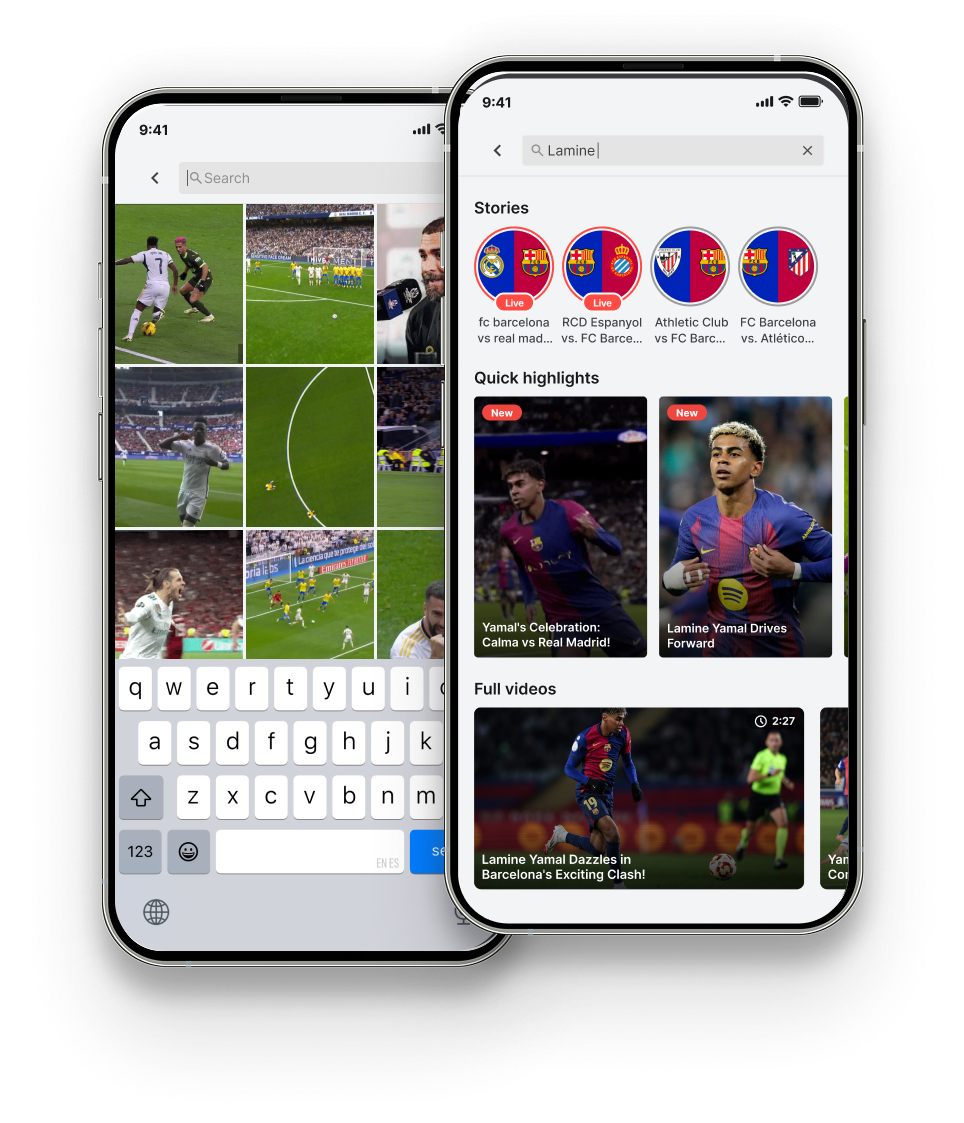
These modes describe label filtering behavior. You can surface search in your app in two ways:
- Custom search UI: Build your own search input (or widget) and pass the viewer query with the
searchdata source type onBlazeDataSourceType. See SDK methods below. - Built-in search screen (mobile): Call
showSearchScreento open the Experiences SDK full-screen search UI (suggestions plus results). See Built-in search screen (mobile).
Common principles (apply to both modes)
- The SDK searches content metadata using the free-text query and returns matching content IDs.
- Content is eligible only if:
- Status is
Active. - The current time is within the schedule window (an active schedule). Note: Schedules must be applied in the context of a label. If the content has no label, add a label such as
text-searchand apply the schedule to that label. - After considering geo restrictions.
- Status is
Free text without labels (global search)
- Search is applied across all eligible content.
- Schedule eligibility is checked regardless of which label the schedule is attached to (if any).
Free text with label filtering (label-scoped search)
- The specified labels first filter content.
- Label filtering considers the schedule attached to the labels (only content within that label schedule window remains eligible).
- The free-text search is then applied to the filtered result set.
Free text content search flow
flowchart TD
  A[SDK free-text search] --> B[Input: free-text query]
  B --> C[Filter: status is active and Geo permitted]
  C -->|true| D{Labels provided?}
  D -- No --> E[Filter: current time within content schedule window]
  E --> F[Filter content metadata using free text]
  F --> G[Return matching content IDs]

  D -- Yes --> H[Filter by specified labels]
  H --> I[Filter: current time within label schedule window]
  I --> J[Filter content metadata using free text]
  J --> K[Return matching content IDs]
Built-in search screen (mobile)
On iOS, Android, and React Native, the Experiences SDK provides a ready-to-use full-screen search experience. You do not build the search field or results layout yourself.
- Launch: Call
showSearchScreento open the screen. You can supply label-based content for a suggestions grid shown before the viewer types (not the free-textsearchdata source type). - Results: After the viewer searches, results are grouped by Stories, Moments, and Videos (same free-text matching and ranking as in this article).
- Moments player: Configure the
searchcontrol onBlazeMomentsPlayerButtonsStyleso viewers can open the same search screen from the player.
API reference: iOS | Android | React Native
Player search button: iOS | Android | React Native
SDK methods
Search data source (mobile)
The search data source type is part of BlazeDataSourceType on iOS | Android | React Native.
Basic syntax and parameters
The Search (free text) data source supports:
- Required:
searchText(the free-text query) - Optional:
maxItems(limit number of results) - Optional: a label expression to scope the search to a labeled subset of content
The optional label expression in Search is only a filter, for example, A AND B, A OR B, or A AND (B OR C). Search doesn't support label priority or ordering.
// iOS
BlazeDataSourceType.search(searchText: "barcelona", maxItems: 20, labels: .mustInclude("football", "highlights"))// Android
BlazeDataSourceType.Search(
searchText = "barcelona",
maxItems = 20,
blazeWidgetLabel = BlazeWidgetLabel.mustInclude("football", "highlights")
)// React Native
{
type: 'search',
searchText: 'barcelona',
maxItems: 20,
labels: BlazeWidgetLabel.mustInclude('football', 'highlights'),
}Web SDK
Free-text search is available as a text data source created with DataSourceBuilder().text(...). The Web SDK doesn't include a built-in search UI component.
See Web SDK.
Updated 2 months ago