
CMS overview
CMS is the place where you control how content created on the platform is delivered to your digital properties through Experiences. It acts as the publication layer, letting you decide what content is delivered, where it appears, and when it becomes available.
Access to CMS is provided via the platform.
How CMS fits into Experiences
flowchart LR
    A(Content generation) --> B(CMS)
    B --> C(Experiences SDK)
    C --> D(Digital properties)
    D --> E(Viewers)

    A:::step
    B:::step
    C:::step
    D:::step
    E:::step
CMS sits between content creation and content consumption as part of the Experiences delivery pipeline:
- Content is generated in the WSC Sports platform
- Content is managed, organized, and scheduled in CMS
- Content is delivered through the Experiences SDK
- Content appears in your digital properties
- Viewers consume the content
CMS controls delivery in real time through the SDK embedded in your digital properties, including iOS, Android, and web.
What CMS is responsible for
At a high level, CMS enables you to:
- Manage and organize content assets produced by the WSC Sports platform
- Control which assets are delivered to your digital properties
- Schedule and automate publishing around campaigns, games, or live events
- Curate experiences for viewers through structured scheduling and labels
- Build and manage CMS-configured widgets in the Widgets tab, then share the widget remote ID with your developer so they can set
widgetRemoteIdentifierin the Experiences SDK
What you need to know
Asset types
CMS manages multiple asset types. Each asset type follows the same publishing model but serves a different purpose in Experiences.
| Asset type | Description |
|---|---|
| Stories | Multi-page narrative content composed of individual pages that play sequentially in the Stories player. |
| Moments | Single event content focused on a specific highlight or action. |
| Videos | On-demand video, including support for multiple aspect ratios. |
| Streams | Streaming video items for scheduled and live events. Streams are delivered to your app through the Videos content type. Streams are listed in CMS, but you can't change stream metadata. Stream metadata can be changed by your WSC Sports account manager. |
Core concepts
Before working with CMS, it’s essential to understand the core concepts that define how content is published and delivered.
| Term | Description |
|---|---|
| Content assets | The primary objects managed in the CMS. Assets are publishable units of content, including different content types such as Stories, Moments, and Videos. |
| Availability status |
|
| Labels | The core content filtering mechanism in the CMS:
|
| Availability schedule | Controls when content is visible:
|
| Experiences SDK |
|
| Digital properties | The destinations where content appears, such as mobile apps and websites powered by the SDK. |
| Analytics | Engagement metrics that show how viewers interact with content and help optimize future publishing decisions. |
Content availability (delivery) mechanism
Content delivery to the SDK is controlled using the following mechanism:
- The SDK requests content filtered by labels.
- The filtered content is made available if all of the following are true:
- Active is on for the content. You can turn it on by hand, or automatically. See Automatic event-based activation.
- The current time matches the content schedule time associated with the label.
flowchart LR
  A[Search content catalog] --> B[Content matches label search]
  B -->|No| N1[No content]
  B -->|Yes| C[Status = Active?]
  C -->|No| N2[Block delivery]
  C -->|Yes| D[Now within schedule window?]
  D -->|No| N3[Block delivery]
  D -->|Yes| Y[Allow delivery]
CMS tour
- In WSC Sports, go to CMS. The CMS console displays.
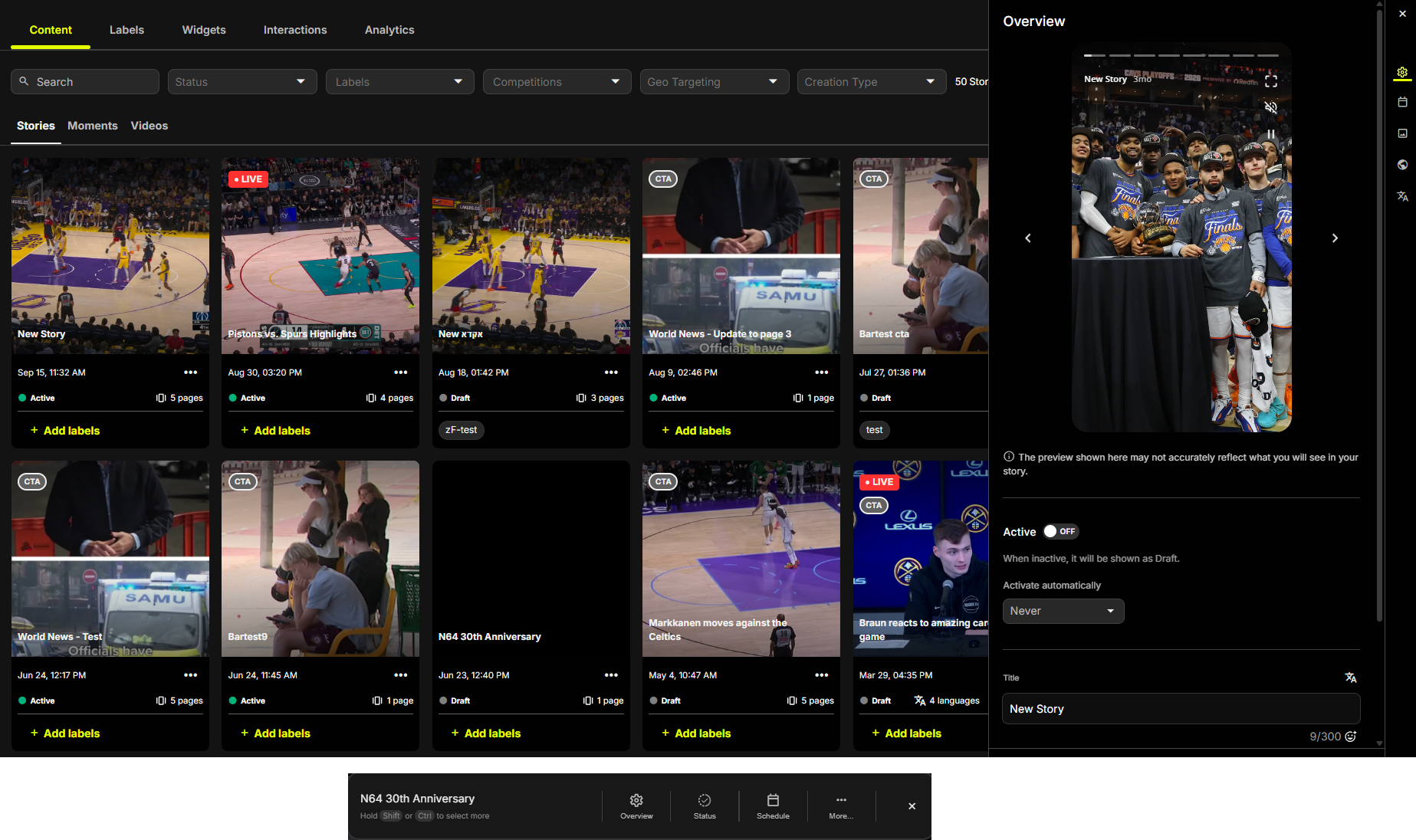
CMS Tabs Overview
The CMS is organized into tabs that help you manage assets, widgets, interactions, labels, and performance insights. Each tab focuses on a specific part of the workflow, making it easy to find and manage what you need.
| Tab | Description | Details |
|---|---|---|
| Content | Browse and manage assets |
|
| Labels | Manage labels |
|
| Widgets | Build CMS-configured widgets |
|
| Interactions | Manage interactive elements | Create and manage interactions such as polls and quizzes. See CMS - viewer engagement (buttons and interactions) |
| Analytics | Analyze viewer engagement |
|
Updated 24 days ago