
Android player container
There are different types of player container that can be integrated:
- BlazeMomentsPlayerContainer - is a class designed to manage and facilitate the playback of moments based on a specified data source type. It provides functionality to embed and control moments playback within a specified container. The container provides flexibility in determining how and where moments are presented, offering customization and delegation to handle various events.
Usage:
Instantiate theBlazeMomentsPlayerContainerwith the desired configuration and delegate, then use thestartPlaying(fragmentManager: FragmentManager, containerView: FragmentContainerView, completion: ((BlazeResult<Unit>) -> Unit)? = null)method to begin playback of moments within the specified containerView. ThedismissPlayer()method allows for graceful playback termination.
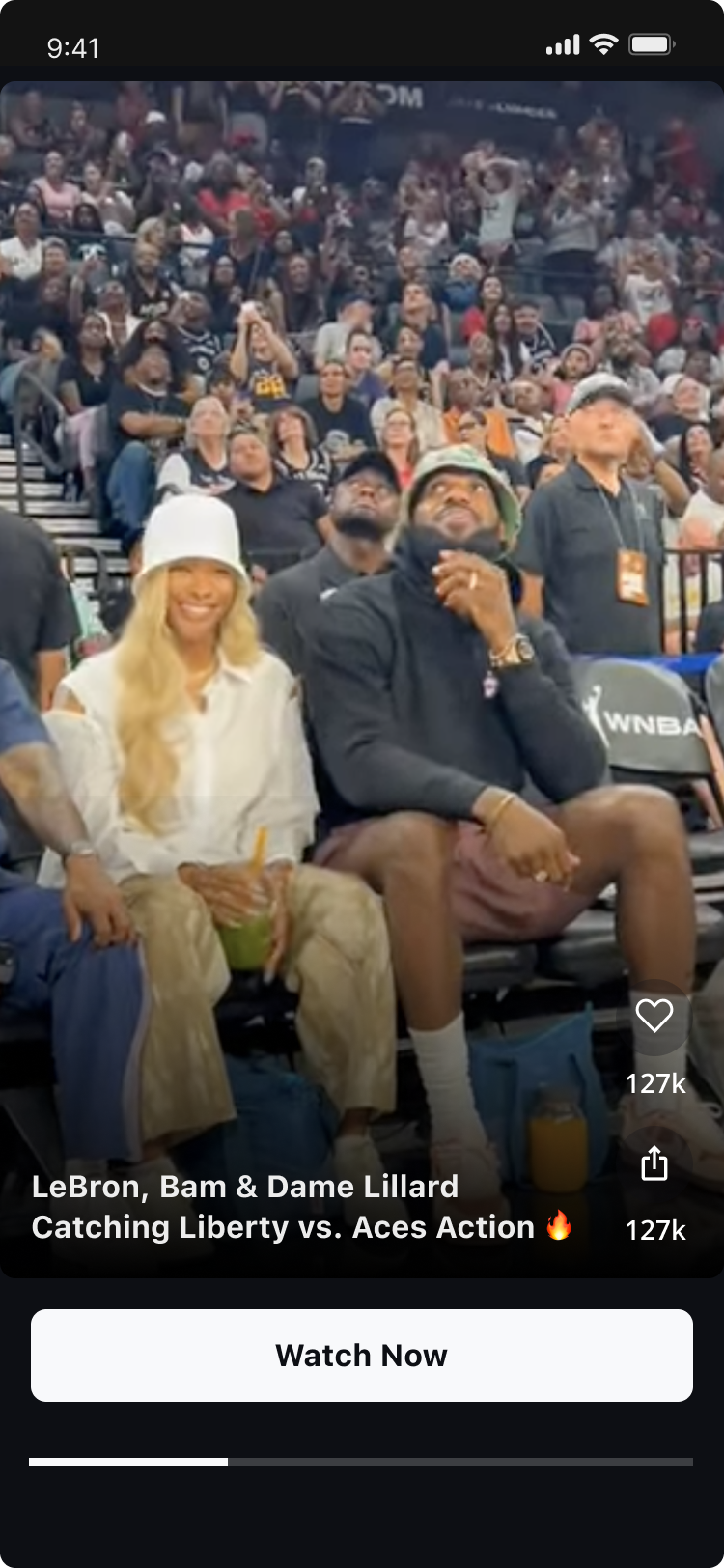
Player Container will notify if any data exists for display.Player Container doesn't provide empty state UI display.
App developers should make sure to decide on proper logic for empty state.
BlazeMomentsPlayerContainer
initialize
Initializes a new instance of BlazeMomentsPlayerContainer
class BlazeMomentsPlayerContainer(
    private val containerView: FrameLayout,
    private val dataSource: BlazeDataSourceType,
    private val playerInContainerDelegate: BlazePlayerInContainerDelegate,
    private val shouldOrderMomentsByReadStatus: Boolean = true,
    private val cachePolicyLevel: BlazeCachingLevel = BlazeSDK.cachingLevel,
    private val containerId: String = dataSource.stringRepresentation + System.currentTimeMillis(),
    private val momentsPlayerStyle: BlazeMomentsPlayerStyle = BlazeSDK.defaultMomentsPlayerStyle,
  private val momentsAdsConfigType: BlazeMomentsAdsConfigType = BlazeMomentsAdsConfigType.FIRST_AVAILABLE_ADS_CONFIG,
private val momentsPlaybackConfiguration: BlazeMomentsPlaybackConfiguration? = null

)
Example
val momentsPlayerStyle = BlazeMomentsPlayerStyle.base()
momentsPlayerStyle.buttons.mute.isVisible = false
momentsPlayerStyle.buttons.exit.isVisible = false
momentsPlayerStyle.seekbar.isVisible = false

val momentsPlayerContainer = BlazeMomentsPlayerContainer(
    containerView = frameLayoutContainer,
    dataSource = BlazeDataSourceType.Labels(BlazeWidgetLabel.singleLabel("some-label")),
    containerId = "some-container-id",
    momentsPlayerStyle = momentsPlayerStyle,
    playerInContainerDelegate = object: BlazePlayerInContainerDelegate {
      //Here is your optional implementation
    }
)
Properties
containerId
var containerId: StringRepresents the identifier of the Blaze Player Container. This identifier MUST be unique per instance in the app.
dataSource
var dataSource: BlazeDataSourceTypeThe dataSource property represents the dataSource associated with the Blaze widget. dataSource is built with BlazeDataSourceType
Representing the dataSource applied to the widget. Modify this property to alter the dataSource used for filtering stories/moments.
cachingLevel
var cachingLevel: BlazeCachingLevelOverrides the cachePolicyLevel for the specific widget. Read more about the options available under the BlazeCachingLevel section.
momentsPlayerStyle
var momentsPlayerStyle: BlazeMomentsPlayerStyleOverrides the moments style for the specific widget. You can modify this property or its properties to change and override the default player momentsPlayerStyle. Read more about the customization options available under the 'Moment Player Customizations' section.
shouldOrderMomentsByReadStatus
var shouldOrderMomentsByReadStatus: BooleanA flag indicating whether moments should be ordered by their read status.
When this flag is set to true, the widget will display moments in an order where unread moments appear first, followed by the read moments.
This flag is true by default.
Note: If all items have been viewed, the original order of moments will be maintained.
adsConfigType
var momentsAdsConfigType: BlazeMomentsAdsConfigTypeUpdate ads configuration according to momentsAdsConfigType.
Default value for momentsAdsConfigType is BlazeMomentsAdsConfigType.FIRST_AVAILABLE_ADS_CONFIG.
playerInContainerDelegate
playerInContainerDelegate: PlayerInContainerDelegateContainer delegates of type BlazePlayerInContainerDelegate for specific container.
momentsPlaybackConfiguration
momentsPlaybackConfiguration: BlazeMomentsPlaybackConfigurationThe playback configurations for the Moments player. See more at BlazeMomentsPlaybackConfiguration.
Methods
startPlaying
method signature
fun startPlaying(completion: ((BlazeResult<Unit>) -> Unit)? = null)Start playing a specific dataSource which was assigned while constructing the BlazeMomentsPlayerContainer class.
- If the content was already prepared using prepareMoments -> using the prepared content.
- If the content wasn't prepared using prepareMoments -> preparing the content before starting the player.
Parameters:
- completion: optional, will be invoked when the player is ready to play.
prepareMoments - Static method
method signature
fun prepareMoments(
    containerId: String,
    dataSource: BlazeDataSourceType,
    cachePolicyLevel: BlazeCachingLevel = BlazeSDK.cachingLevel,
    shouldOrderMomentsByReadStatus: Boolean = true,
    completion: ((BlazeResult<Unit>) -> Unit) = { }
)
Prepares moments for a specific dataSource type - static method.
This static method prepares and loads moments for the given dataSource, which is built using BlazeDataSourceType .
Important: BlazeRecommendationsType.FOR_YOU is unsupported for preparation and throws a onDataLoadComplete error.
This type of data source should be used only to play content directly, using the startPlaying method.
Parameters:
containerId: Represents the identifier of the Blaze Player Container. This identifier MUST be unique per instance in the app.dataSource: Represents the dataSourceType associated with the Blaze Player Container. dataSourceType is built withBlazeDataSourceType.cachePolicyLevel: Represents the cache policy level of the Blaze Player Container. Defaults to The policy level that was defined in the global level.shouldOrderMomentsByReadStatus: A flag to indicate whether moments should be ordered by their read status. defaults to true.completion: Block that will be invoked when prepare task is finished.
Note: This function is static.
Usage
You can prepare the content in advance, from any context you would like (i.e., call this from host Activity, so when user enters the Container tab, content will already be fetched).
Example:
BlazeMomentsPlayerContainer.prepareMoments(
  containerId = "container-moments-uniqe-id",
  dataSource = BlazeDataSourceType.Labels(BlazeWidgetLabel.singleLabel("some-label"))
)
dismissPlayer
method signature
fun dismissPlayer()Resumes playback player.
resumePlayer
method signature
fun resumePlayer()Resumes playback player. If the player is not currently paused, this method has no effect.
pausePlayer
method signature
fun pausePlayer()Pauses the player. This method does not dismiss the player; it simply pauses playback, allowing for later resumption.
onVolumeChanged
method signature
fun onVolumeChanged()Call this function whenever volume change through device keys was detected. This will allow the SDK to properly manage mute/unmute state.
For more information, click here
updatePlaybackConfiguration
method signature
fun updatePlaybackConfiguration(playbackConfiguration: BlazeMomentsPlaybackConfiguration?)Updates the playback configuration for the moments player.
playbackConfiguration: The new playback configuration to apply.
Pass null to reset to the global default playback configuration.
BlazePlayerInContainerDelegate
BlazePlayerInContainerDelegate is a interface that extends the functionalities of BlazePlayerSourceDelegate and provides additional callback player contained within a container.. This delegate allows your app to handle various types of events.
All functions in this interface are optional, the choice of which function to implement is left for app developers.
IMPORTANT - Player audio
To preserve the 'out-of-the-box' behavior regarding mute/unmute (i.e., when the user increases/decreases his device volume, the mute/unmute state of the player behaves accordingly) - application developers must include the following code in the player host Activity:
override fun onKeyUp(keyCode: Int, event: KeyEvent?): Boolean {
    return if (keyCode == KeyEvent.KEYCODE_VOLUME_DOWN || keyCode == KeyEvent.KEYCODE_VOLUME_UP) {
      // momentsPlayerContainer should be assigned with the BlazeMomentsPlayerContainer instance.
      momentsPlayerContainer.onVolumeChanged()
      true
    } else {
      super.onKeyUp(keyCode, event)
    }
}
The SDK will handle the player's audio behavior after onVolumeChanged is called.
Update player container
If you need to update one of the container's properties (data source for example):
- Dismiss the current container instance:
momentsPlayerContainer.dismissPlayer()- Assign a new instance to the container variable:
momentsPlayerContainer = BlazeMomentsPlayerContainer(
    dataSource = BlazeDataSourceType.Labels(BlazeWidgetLabel.singleLabel("some-label")),
    containerId = "some-container-id",
    momentsPlayerStyle = momentsPlayerStyle,
    playerInContainerDelegate = object: BlazePlayerInContainerDelegate {
      //Here is your optional implementation
    }
)- Call the start playing method:
momentsPlayerContainer.startPlaying(
  fragmentManager = childFragmentManager,
  containerView = binding.myFragmentContainerView
)
Important - when you update the player container, it is crucial that you use different containerId for the new instance, so the SDK won't try to restore the previous instance.
Updated 2 months ago