
Widget item text placement (title and subtitle)
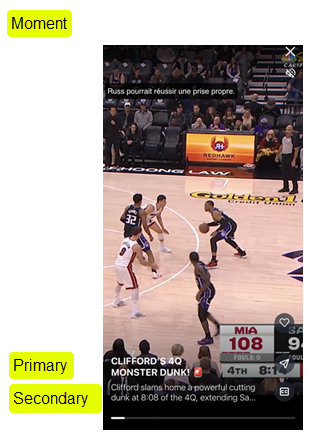
Widgets include primary and secondary text placeholders that are populated from the content item’s metadata. In the SDK, these placeholders are referred to as Title and Subtitle, and they are configured using BlazeVideosPlayerHeadingTextStyle.
For each placeholder, you can choose whether to display the content item’s title or subtitle, giving you control over which text appears in each location.
The available placeholders vary by widget type, as shown in the table below. The exact placement of each placeholder within a widget is controlled using WidgetItemTitle.position().
Example - title and subtitle in a Moment
| Widget type | Title (primary) placeholder | Subtitle (secondary) placeholder |
|---|---|---|
| Moments | Y | Y |
| Stories | Y | N |
| Videos | Y | N |
WidgetItemTitle class
Use the WidgetItemTitle class to customize the properties listed.
| Name | Description | Type | Default value |
|---|---|---|---|
| position | Title position | BlazeObjectPositioning | Bottom center |
| insets | Insets | Insets | Zero |
| isVisible | Visibility of title | Bool | true |
| unreadStyle | Unread title style | WidgetItemTitleStyle | Default settings |
| readStyle | Read title style | WidgetItemTitleStyle | Default settings |
Default title styles
| Style name | Font | Letter spacing | Text color | Line height | Number of lines | Alignment |
|---|---|---|---|---|---|---|
| unreadStyle | systemFont(12) | 0 | .black | 0 | 2 | .center |
| readStyle | systemFont(12) | 0 | .black | 0 | 2 | .center |
Updated 2 months ago
Did this page help you?